# \[c++] Registering Metadata Tags
## The Manual Method
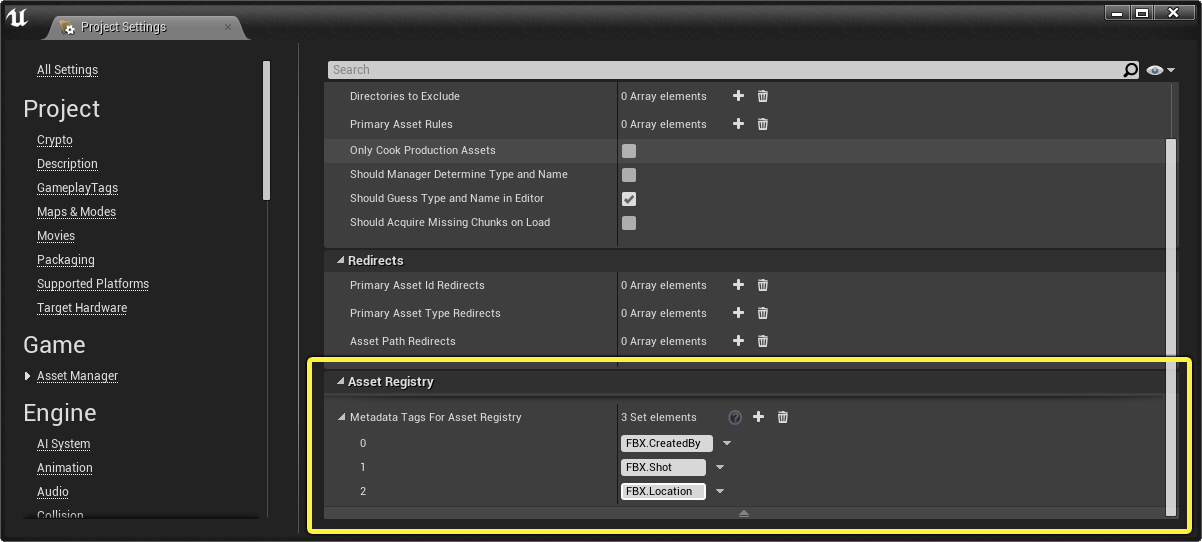
The manual method to declare Metadata Tags can be found in the Project Settings:
Any tags added to this list will be registered as valid asset metadata we can use in the editor and with any tools we create.
***
## Programmatically Registering Metadata
When creating tools for Unreal we can sometimes find ourselves wanting to add new metadata tags. Unfortunately, there aren't any options available in the Unreal Python API to register Metadata Tags to the Asset Registry - we'll have to expose this in C++
***
## The C++ Function Method
The following is a C++ header / cpp file function that will allow us to register metadata tags to the Asset Registry. It is also available in the Sample Plugin provided on Github for the Unreal Python Recipe Book:
{% @github-files/github-code-block url="" %}
### The C++ Code
The code below can be added to a c++ Blueprint Function Library class.
The .h code:
```cpp
/** Add new metadata tag names to the Asset Registry
* @param Tags the metadata tags to add
*/
UFUNCTION(BlueprintCallable, Category = "Python | Utils")
static void RegisterMetadataTags(const TArray& Tags);
```
The .cpp code:
```cpp
void
UPythonUtilsLibrary::RegisterMetadataTags(const TArray& Tags)
{
TSet& GlobalTagsForAssetRegistry = UObject::GetMetaDataTagsForAssetRegistry();
for (FName Tag : Tags)
{
if (!Tag.IsNone())
{
if (!GlobalTagsForAssetRegistry.Contains(Tag))
{
GlobalTagsForAssetRegistry.Add(Tag);
}
}
}
}
```
{% hint style="info" %} Note: `PythonUtilsLibrary` is used in the Sample Plugin for the BP Function Library class name, but you can use another class name as desired
{% endhint %}
### Calling it in Python
With our c++ function compiled and the Plugin enabled, we can use the following logic to call it:
```python
unreal.PythonUtilsLibrary.register_metadata_tags(["a", "b", "c"])
```
{% hint style="info" %} Note: `PascalCase` and `camelCase` c++ function names automatically convert to `snake_case` in Unreal Python. This is done to be more pythonic, it's a good reminder to be careful when going between c++ and Python in Unreal.
{% endhint %}